
PESCO New Connection ENC System in Pakistan – Complete Guide
If you are planning to get a PESCO new connection for your home, shop, or business, this complete guide will help you understand the full process in a simple and clear way. PESCO (Peshawar Electric Supply Company) provides electricity connections across Khyber Pakhtunkhwa through its official ENC (Electricity New Connection) portal, making the application process easier, faster, and more transparent than ever.
Today, you don’t need to visit offices multiple times or go through complicated paperwork. You can apply online, submit required documents, track your application status, and pay connection fees directly through the system. Whether you are applying for a residential, commercial, or industrial connection, this guide will walk you through every step in a practical and easy-to-follow way.
If you are an electricity consumer, you can easily check your PESCO bill online in seconds or use the online bill calculator to estimate your monthly charges anytime without any hassle.
How to Apply Online for a New Connection through the ENC System?
Applying for a new electricity connection from PESCO can be done in two ways: offline through the nearest office or online through the ENC (Electricity New Connection) system. Both methods are designed to make the application process easier for consumers, but the online system is faster, more convenient, and reduces the need for repeated office visits.
Offline Application Method (Traditional Process)
In the offline method, applicants need to visit the nearest WAPDA office to collect the PESCO online application form. After filling out the form, they must attach the required documents, such as a CNIC copy, property ownership proof, and other supporting papers. The completed application is then submitted to the office, where it goes through manual verification and processing. This method usually takes more time due to physical handling and multiple office visits.
Online Application For a New Connection (ENC System)
Applying for a PESCO online meter connection through the ENC (Electricity New Connection) system is now a simple digital process designed to save time and reduce paperwork. Instead of visiting offices multiple times, the application method is detailed below in a step-by-step format. As a result, you can apply for PESCO New Connection online.
You can use the ENC website to easily apply online for a new electricity connection and track your application status in real time. It also allows you to stay updated on each step of the process, so you always know what is happening with your request.
- Step 1: Visit ENC Portal
- Start by opening the official ENC portal and selecting your electricity distribution company such as PESCO.
- Step 2: Choose Connection Type
- Select the type of connection you need, whether it is domestic, commercial, or industrial, based on your usage.
- Step 3: Fill Application Details
- Enter your personal information, including CNIC, mobile number, name, and complete address of the connection location.
- Step 4: Add Property Information
- Provide ownership or rental details along with any required supporting information for verification.
- Step 5: Upload Documents
- Attach scanned copies of required documents like CNIC, property proof, and other necessary papers.
- Step 6: Submit Application
- Review all details carefully and submit your application through the ENC system.
- Step 7: Verification Process
- PESCO will verify your application and documents before approval.
- Step 8: Demand Notice Issued
- After approval, a demand notice will be generated showing connection charges.
- Step 9: Payment of Charges
- Pay the demand notice fee through bank or online payment channels.
- Step 10: Connection Installation
- Once payment is confirmed, PESCO will schedule installation of your new electricity connection.
What Is the ENC System and How Does It Work?
The ENC (Electricity New Connection) System is an official online portal introduced by electricity distribution companies in Pakistan, including PESCO, to simplify the process of applying for a new electricity connection. It allows users to submit applications, upload required documents, track progress, and receive updates without visiting any office physically.
This system is part of the digital transformation of the Government of Pakistan Electricity System, designed to make the connection process faster, more transparent, and user-friendly.
How the ENC System Works
The ENC system works in a fully digital flow that connects the applicant directly with the electricity distribution company’s database.
- First, the user fills out an online application form with personal and property details.
- Then, required documents such as CNIC and ownership proof are uploaded to the system.
- After submission, the application is sent for verification by the concerned electricity company (like PESCO).
- Once verified, a demand notice is issued showing the connection charges.
- After payment, the installation is scheduled, and your new electricity connection is installed.
In simple terms, the ENC system streamlines the entire new connection procedure by allowing users to apply online, submit documents, get verification, and receive installation approval without visiting any office.
Essential Documents Required for PESCO New Connection Online
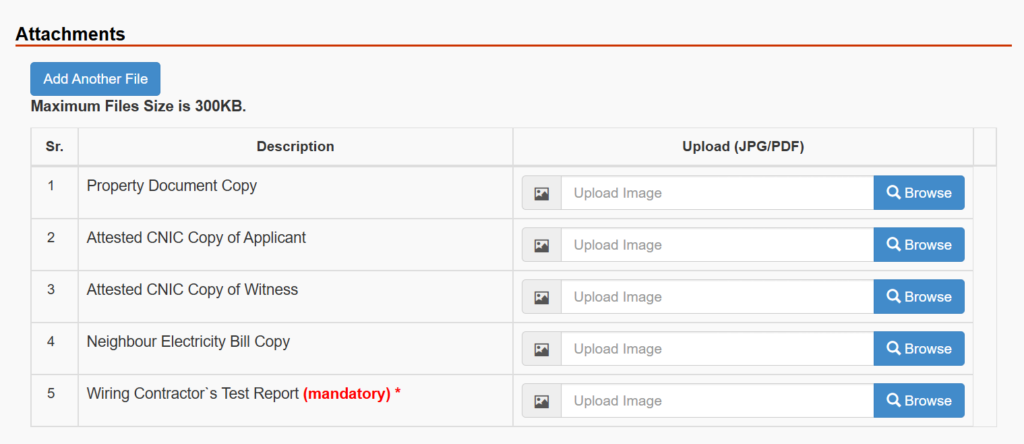
Before applying for a new electricity meter connection, it is important to prepare all the required documents in advance. Having the correct paperwork ready helps speed up the application process, avoids delays, and ensures smooth verification through the ENC system. These documents are essential for confirming your identity, property details, and eligibility for a PESCO online connection.
The image below provides a clear overview of all the required documents, helping you easily understand what to prepare before submitting your application.
What Happens Next?
Once you submit your application through the ENC system, the process moves step by step in the backend. Here’s what usually happens next:
- PESCO will check your application and documents for verification.
- A field survey may be conducted (if required).
- Demand notice is issued after approval.
- You download and pay the demand notice.
- Pay the amount on the demand notice at a bank.
- Final connection installation is scheduled.
- Electricity meter is installed at your location.
This step-by-step process ensures a smooth and transparent journey from application submission to final electricity connection without unnecessary delays.
How to Download a Demand Notice Online?
Downloading your PESCO demand notice through the ENC system is a simple procedure that can be done online without visiting any office. Just follow these steps:
- Open ENC Portal:
Start by visiting the official ENC (Electricity New Connection) website where you submitted your application. - Login to Your Account:
Log in using your CNIC number, registered mobile number, or application reference details. - Track Your Application:
Go to the “Track Application” section to check the current status of your request. - Wait for Approval
Once your application is approved by PESCO, the demand notice download option will become active. - Download Demand Notice:
Click on the download button to save your demand notice in PDF format, which you can print or use for payment.
After downloading, you can print the demand notice and use it for payment at the bank or online platforms to proceed with your new electricity connection.
Latest PESCO New Connection Charges in 2026
This provides a simple and up-to-date overview of the latest PESCO new connection charges for 2026, helping users clearly understand the estimated cost of different connection types before applying.
| Connection Type | Charges (Approx.) | Details |
|---|---|---|
| Single-Phase Connection | PKR 7,500 – PKR 9,500 | Standard residential connection for small household load |
| Security Deposit (Residential) | PKR 1,220 per kW (Urban) / PKR 610 per kW (Rural) | Refundable deposit based on load requirement |
| Three-Phase Connection | PKR 30,000 – PKR 60,000+ | Used for commercial and higher load requirements |
| Industrial Load Connection | Varies (Higher than commercial) | Depends on load capacity and site requirements |
How to Pay Your PESCO Demand Notice Fee?
You can pay your PESCO demand notice fee using both online and offline methods, depending on your convenience. Once your demand notice is issued through the ENC system, you just need to select a payment method and complete the transaction.
Offline Payment (Bank Counter Method)
If you prefer traditional methods, you can visit any authorized bank branch and pay your demand notice fee in cash. Simply take your printed demand notice and submit it at the counter.
You can pay through these banks:
- HBL (Habib Bank Limited)
- UBL (United Bank Limited)
- MCB Bank
- Allied Bank Limited
- Meezan Bank
- Bank Alfalah (in selected branches)
After payment, the bank will issue a stamped receipt as proof, which is important for further processing of your connection.
Online Payment Methods (Fast & Easy)
If you want a quicker option, you can pay your fee online using mobile apps or internet banking. Just enter your demand notice details or reference number and complete the payment in seconds.
Available online options include:
- JazzCash App
- Easypaisa App
- NayaPay
- SadaPay
- HBL Mobile App
- UBL Digital / Internet Banking
- MCB Live App
- 1LINK supported banking systems
These methods are fast, secure, and allow you to pay from anywhere without visiting a bank.
Once your payment is successfully completed, the ENC system automatically updates your application status. After verification, your case moves forward for final connection scheduling and installation.
Time Required for PESCO New Connection
The time required to get a new electricity connection from PESCO depends on the type of connection and how quickly your documents are verified and approved through the ENC system. In general, the process can take a few days to several weeks, depending on the type of your electricity connection.
| Category | Time Required |
|---|---|
| Voltage level up to 400 V and Load up to 500 kW | 30 days |
| Voltage level 11 or 33 KV and Load up to 5000 kW | 53 days |
| Voltage level up to 66 KV and Load above for all loads | 73 days |
| Voltage level 11 or 33 KV and load up to 5000 kW | 106 days |
| Voltage level up to 400 V and load up to 70 kW | 496 days |
Most Important Tips for a Smooth Application
To ensure a hassle-free PESCO new connection application, it is important to follow a few key practices that help avoid delays and rejection during the ENC process.
- Make sure all your documents are clear, valid, and properly scanned before uploading them to the ENC system.
- Enter accurate personal and property details to avoid verification issues later in the process.
- Double-check your CNIC number, mobile number, and address before submitting the application.
- Choose the correct connection type (domestic, commercial, or industrial) according to your usage.
- Keep a copy of your application and reference number for future tracking and updates.
- Regularly check your application status on the ENC portal to stay updated on progress.
- Ensure timely payment of the demand notice once it is issued to avoid delays in installation.
Following these tips will help you complete your application smoothly without unnecessary delays or complications.
If you are not satisfied with the services, you can quickly submit a complaint through the Complaint Management System.
Frequently Asked Questions (FAQs)
Conclusion
Applying for a PESCO new connection online is simple and convenient. Before applying for a WAPDA online connection, keep your CNIC copy, property proof, neighbour bill, and wiring test report ready. Submit your application through the ENC portal or the concerned PESCO office. After submission, save your tracking ID because you will need it to check the status and download the demand notice. Once you pay the demand notice, keep the receipt safe for verification. Always follow the official PESCO or ENC instructions for final fees, timelines, and document requirements. You don’t need to stand in long lines. You can pay your electricity bill easily through JazzCash, EasyPaisa, or other PESCO online bill payment methods.