
PESCO Online Bill Check 2026: Download Duplicate Bill Copy
The Peshawar Electric Supply Company (PESCO) provides a simple and easy way to check and pay your PESCO online bill. Pescobillcheck.com helps you check your PESCO duplicate bill quickly and safely in a few seconds. Enter your 14-digit reference number or 10-digit consumer ID (it’s also called customer ID) to view your latest electricity bill, due date, payable amount, meter reading, and consumed units in one place. You can also download and print your PESCO e-bill for your personal records. This is helpful when your paper bill is late, lost, and damaged.
PESCO Online Bill Check
Enter your Reference Number or Consumer ID to view your latest bill
If you are not sure where to find your 14-digit reference number or 10-digit consumer ID, check the sample bill image below. It will help you easily identify the correct number before checking your PESCO online bills. This website helps you access your bill through the Pesco online billing system. Don’t save or share your personal data.
How to Check PESCO Duplicate Bill Online?
Checking your Peshawar electricity bill is now a very simple and fully digital process. Instead of waiting for a printed copy or visiting a customer office. You can instantly view your latest duplicate PESCO bill online through the official PITC (Power Information Technology Company) system, which powers online electricity bill services for distribution companies across Pakistan.
Method allows every consumer of Peshawar Electric Supply Company (PESCO) to access their bill details in real time through the PESCO official website, including current charges, units consumed, the issue date, and previous billing history.
Step-by-Step Method to Check PESCO Duplicate Bill Online
Follow these simple steps to view your bill:
This helps users manage KPK electricity bills online without physical paperwork.
If you want to calculate your electricity bill yourself, check our PESCO Online Bill Calculator.
How to Find Your PESCO Reference Number and Consumer ID?
Peshawar Electric Power Company bill reference number or Consumer ID, you can follow these steps:
If you have an old WAPDA bill from PESCO, you can find the consumer number or reference number in the top left corner of the bill. You will see a letter ‘U’ or ‘R’ written next to the reference no in your original Peshawar online bill. This depends only on your area of residence, whether it is Urban (U) or Rural (R). This letter is not entered in the bill check tool only use the number.
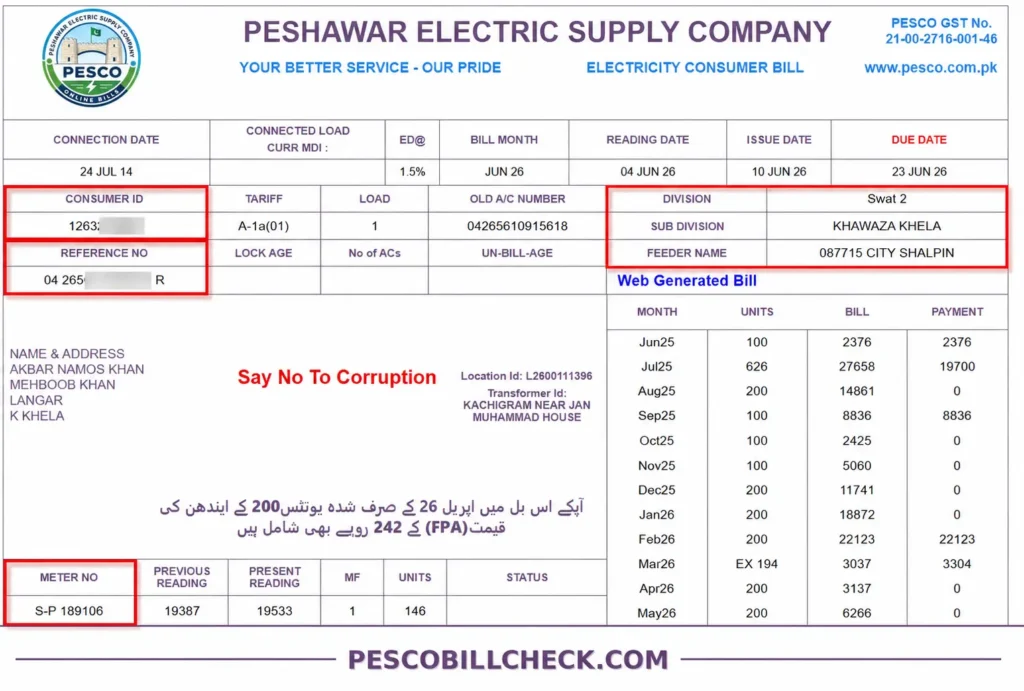
What is the PESCO Reference Number?
You can easily locate your reference number (14-digit code) on your PITC web bill:
Example format: 12 3456 7890 1234
What is the PESCO Consumer ID?
You can also check your PESCO electricity bills online using your 10-digit customer ID. This is a unique ID that is located on the top section of your WAPDA bill, right above the reference no. You can access your PESCO online bill by simply providing your customer identification number.
Example format: 1234567890
Why Use This PESCO Online Bill Checking Tool?
The PESCO Online Bill Checking Tool provides a fast and convenient way to access your PESCO monthly bill, verify the due date, and download a duplicate copy directly from the official PITC portal. It eliminates the need to visit offices and helps you avoid late payment charges by giving instant access to accurate billing information anytime, anywhere.
These simple steps bring the benefits of checking your WAPDA online bill:
Access Your Bill Anytime
You can view online your electricity bill in Peshawar anytime by entering your reference number, without waiting for a printed copy or visiting any office.
No Need to Visit Offices
You do not need to visit a customer service center for a hard copy. This saves time and travel costs.
Instant Bill Checking
You can view your PESCO electric bill within seconds by simply entering your reference no online, making the process fast and hassle-free.
Accurate Information
The system provides up-to-date and reliable billing details, ensuring you always see the correct bill amount, due date, and usage information.
Understanding the Most Important Details on Your Electricity Bill
Meter Reading and Units Consumed
Your bill shows current and previous meter readings along with total units consumed in the billing period, which directly determines your final electricity charges.
Late Payment Surcharge and Additional Charges
If the bill is not paid by the due date, extra charges are added as a late payment surcharge along with other applicable fees, which increase the total payable amount.
Export, Import, and Net Units (For Solar and Net Metering Users)
For solar and net metering users, the bill shows exported electricity sent back to the grid, imported units consumed from the system, and the final net units used, which are used to calculate the actual billing amount.
Consumer Information and Tariff Category
This part includes your basic account details, such as consumer name, connection type, and tariff category, which help define how your electricity usage is billed according to NEPRA-approved rates.
About the PESCO
PESCO (Peshawar Electric Supply Company) is responsible for the distribution of electricity in Peshawar and its surrounding regions. Because of its historical link with the national power system, many people still commonly refer to it as a “WAPDA bill”.
PESCO is one of Pakistan’s major electricity distribution companies, established during the power sector restructuring in 1998. It serves the entire Khyber Pakhtunkhwa (KPK) province and operates under the broader framework of the national power system previously associated with WAPDA.
PESCO (Peshawar Electric Supply Company) operated through 9 circles. However, in a restructuring move, the Hazara-I and Hazara-II circles were separated and transferred to HAZECO (Hazara Electric Supply Company). As a result, the current PESCO network now consists of 8 operational circles across Khyber Pakhtunkhwa.
Areas Under PESCO
As of now, the following are the (8) circles of PESCO covering about 1,204,621 Hectares of land:
PESCO Head Office Map Location
How to Apply for a New Connection & Meter Transfer Procedure?
If you purchased a new house and the electricity connection is still registered in the previous owner’s name, you’ll need to apply for a meter ownership transfer (name change). If the property doesn’t have an active electricity connection, you can apply for a PESCO new connection online through the ENC (Electricity New Connection) system. Our complete guide explains the application process, required documents, and how to submit your request online.
How to Download a Duplicate PESCO Bill Online?
The duplicate electricity bill, download it. It only takes a few seconds and helps you avoid visiting PESCO offices. Follow these steps:
This process helps you quickly get a duplicate copy of your PESCO bill download anytime without any hassle or office visit.
How to Check the PESCO Online Bill Payment Status?
Knowing your PESCO bill payment status helps you confirm whether your WAPDA bill has been successfully paid or is still pending. You can quickly verify it online using your bill details.
After paying your bill, it’s a good idea to confirm that the payment has been recorded. In most cases, payment updates appear within 24 hours.
Check Paid or Unpaid Status
Enter your 14-digit reference number or 10-digit consumer ID on the official PESCO bill checking page to view your full bill. If the bill is still unpaid, you’ll see the outstanding amount and due date. Once the payment is recorded, the outstanding balance will no longer appear, or the bill will show as paid.
Verify Your Payment Details
If you need to confirm the payment, check the receipt or transaction history from the service you used, such as your bank, ATM, internet banking app, Easypaisa, or JazzCash.
If your bill still appears unpaid after 24 hours, keep your payment receipt and contact your bank, mobile wallets provider, or PESCO customer support.
Read our complete guide on PESCO bill payment methods for step-by-step instructions and available online payment options.
All Taxes and Charges Included in a PESCO Bill
Your PESCO electricity bill includes several government-approved taxes and charges, including income tax where applicable, that contribute to your total payable amount. Below is a simple breakdown of each component so you can easily understand how your bill is calculated.
Fuel Price Adjustment (FPA)
This is a variable charge that changes every month based on fuel costs used for electricity generation. It directly affects your total bill and may increase or decrease depending on market fuel prices.
TV Fee (Rs 35)
This is a fixed government charge added to your WAPDA bill each month for public broadcasting services, and it remains the same regardless of your electricity usage.
General Sales Tax (GST) (17%)
GST is a government tax added to your pesco online bill. It is charged on the bill amount and included in the total payable balance every month. This tax is not a PESCO service charge; it is collected as part of government taxation.
Financing Cost (FC) Surcharge
FC Surcharge is an additional charge added to electricity bills to recover the financial costs of the power sector. It helps cover expenses such as loans, system maintenance, and electricity supply management. This charge is collected to support the overall power infrastructure and is included in the total bill amount.
Tariff Rationalization Surcharge (TR Surcharge)
This is an adjustment charge used to balance electricity pricing across different consumer categories, ensuring uniform tariff rates under the government’s energy pricing policy.
Quarterly Tariff Adjustment (QTA)
This is a periodic charge or relief applied every quarter to adjust electricity rates based on changes in fuel costs, inflation, and overall power generation expenses approved by NEPRA.
Electricity Duty (1.5%)
This is a provincial government tax charged at 1.5% of your electricity consumption cost, which is added to your monthly bill as part of regulatory electricity charges.
Meter Rent and Fixed Charges
This is a monthly fixed cost included in your electricity bill for the use of the electricity meter and basic service availability, and it is charged regardless of your actual electricity consumption.
How to Reduce Your Electricity Bill During PESCO Peak Hours?
The unit consumed during peak hours is more expensive than at other times of the day. The consumed units during peak hours are written separately on bills of net metering solar consumers. This helps the consumer to reduce electricity usage during these hours to reduce their bills. Peak hour timings are notified by PESCO and may vary seasonally as per NEPRA guidelines. The following is the current peak hours table.
| Season | Peak Hours |
| March to May | 6:00 PM – 10:00 PM |
| June to August (Summer) | 7:00 PM – 11:00 PM |
| September to November | 6:30 PM – 10:30 PM |
| December to February (Winter) | 5:00 PM – 09:00 PM |
PESCO Electricity Tariff and Unit Slabs
Electricity tariffs in PESCO are regulated by NEPRA and implemented under the Government of Pakistan’s energy policies. The billing rate is based on the number of units consumed, and it increases as your electricity usage goes higher, according to different slab categories.
How PESCO Tariff Works
Why Your Bill Changes
Even if you use the same number of electricity units, your bill amount can still vary due to several factors, such as changes in tariff slabs, Fuel Price Adjustment (FPA), and other government-approved surcharges. You can also check the latest PESCO unit rates to see how different tariff slabs affect your WAPDA bill. Quarterly tariff updates, variations in additional charges, and differences in peak-hour usage can also affect your final bill amount from month to month.
Safety Tips and Guidelines for PESCO Consumers
Electricity is an essential part of daily life, but it should always be used with proper care to prevent accidents and electrical hazards. Whether you are using electricity at home or checking your PESCO online bill, following basic safety practices can help protect your family, property, and electrical appliances from serious damage.
Avoid Overloading Electrical Circuits
Using too many appliances on a single socket or circuit can cause overheating, short circuits, and even fire hazards. Always distribute electrical load properly and avoid plugging high-power devices into the same outlet to ensure safe and stable electricity usage.
Keep Electrical Appliances Away from Water
Water conducts electricity very easily, which makes it extremely dangerous when it comes into contact with electrical appliances. Even a small amount of moisture can cause electric shocks, short circuits, or permanent damage to devices. Always place appliances in dry areas, avoid using them near sinks or bathrooms, and never touch switches or plugs with wet hands.
These simple precautions not only reduce the risk of electrical accidents but also help protect your appliances, improve energy safety, and save electricity in the long run. Regularly checking your PESCO eBill can also help you monitor your electricity usage and manage your monthly bill more effectively.
Regularly Check Wiring and Connections
Regular inspection of electrical wiring and connections is important to identify any wear, loose joints, or damage before they become serious hazards. Faulty wiring can lead to short circuits, power failures, or even fire risks, so it’s always better to get them repaired by a qualified electrician on time.
Stay Away from Power Lines and Transformers
Always maintain a safe distance from overhead power lines and electrical transformers, as they carry high-voltage electricity that can be extremely dangerous. Avoid climbing poles, flying kites near wires, or touching any exposed electrical equipment, and immediately report any damage to the concerned electricity department.
Use Certified Electrical Equipment
Always use certified and approved electrical equipment to ensure safety and reliability in your home or workplace. Low-quality or unbranded products can increase the risk of short circuits, electric shocks, and fire hazards, so choosing tested and standard-compliant devices is always a safer option.
Customer Complaint Management System (CCMS)
The Customer Complaint Management System (CCMS) is a dedicated system by PESCO that allows consumers to register, track, and resolve electricity-related complaints quickly and efficiently. It helps improve service quality and ensures a timely response to public issues.
How to Register a Complaint
Consumers can register their PESCO complaints through the official CCMS portal, helpline, or nearest customer service center. You can report issues like power outages, billing errors, faulty meters, voltage problems, transformer faults, or incorrect meter readings or meter number. Make sure to provide your reference ID, consumer ID, and a clear description of the issue for quick processing.
If you want to understand the full process, our PESCO Complaint Registration Guide explains each step clearly.
Most Common FAQs about PESCO Online Bill Check
Final Words
The PESCO Online Bill Tool provides a simple, fast, and reliable way for PESCO bill checking from anywhere. With this tool, you can easily view your bill details, due date, payable amount, and other important information without visiting any office. Our goal is to make online bill checking easy and convenient for every user. If you face any issues while checking or downloading your PESCO duplicate bill, contact us for quick support. Share this tool with your friends and family so they can check their bills easily.